Monday, 6 June 2016

Anniversary of the Battle of Midway 4-7 June 1942


Credit: heeve.com/

Although the Battle of Midway had been in preparation since the Battle of the Coral Sea one month earlier, & the battle itself continued for 4 days, it was substantially won & lost in the space of 5 minutes – at 10:201 on 04 June, attacks began which destroyed 3 Japanese aircraft carriers:

10:201 aircraft carrier Kaga
Akagi
10:25 Soryu

At 17:05 the same day, Japanese carrier Hiryu was also destroyed.

Dauntless dive bombers2 accounted for all Japanese shipping losses.

Losses3

Japan

4 carriers sunk
1 heavy cruiser sunk
1 heavy cruiser damaged
248 aircraft destroyed
3,057 killed
37 captured


USA

1 carrier sunk
1 destroyer sunk
~150 aircraft destroyed
307 killed


https://en.wikipedia.org/wiki/Battle_of_Midway

http://www.heeve.com/modern-history/the-battle-of-midway.html
__________

1 “Battlefield S1/E3 - The Battle of Midway”, PolyGram Video International

2 Wikipedia: “Douglas SBD Dauntless”, https://en.wikipedia.org/wiki/Douglas_SBD_Dauntless#Specifications_(SBD-5)

3 Wikipedia: “Battle of Midway”, https://en.wikipedia.org/wiki/Battle_of_Midway
/ Battle of Midway decisive naval battle Pacific Theater of World War II World War 2 World War Two between 4 and 7 June 1942 six months after Japan attack on Pearl Harbor one month after the Battle of the Coral Sea United States of America USA US Navy Admirals Admiral Chester Nimitz Frank Jack Fletcher Raymond A. Spruance decisively defeated attack attacking fleet Imperial Japanese Navy Admirals Admiral Isoroku Yamamoto Chuichi Nagumo Nobutake Kondo Midway Atoll inflicting devastating damage Japanese fleet irreparable military historian John Keegan most stunning and decisive blow in the history of naval warfare operation earlier attack on Pearl Harbor eliminate the United States as a strategic power in the Pacific Greater East Asia Co-Prosperity Sphere Japanese demoralizing defeat force U.S.A. capitulate Pacific War ensure Japanese dominance in the Pacific luring American aircraft carriers trap occupying Midway overall barrier strategy extend Japan's defensive perimeter response Doolittle air raid on Tokyo operation preparatory preparation further attacks Fiji Samoa Hawaii plan handicapped faulty Japanese assumptions American reaction poor initial dispositions American codebreakers determine date location planned attack forewarned U.S. U.S.A. US USA Navy prepare ambush four Japan's large aircraft carriers Akagi Kaga Soryu Hiryu six-carrier force that had attacked Pearl Harbor six months earlier heavy cruiser sunk U.S. lost aircraft carrier Yorktown destroyer Battle of Midway exhausting attrition Solomon Islands campaign Japan's capacity replace losses materiel particularly aircraft carriers men well-trained pilots maintenance crewmen mounting casualties United States massive industrial training capabilities losses easier to replace Battle of Midway considered turning point in the Pacific War /

Sunday, 5 June 2016

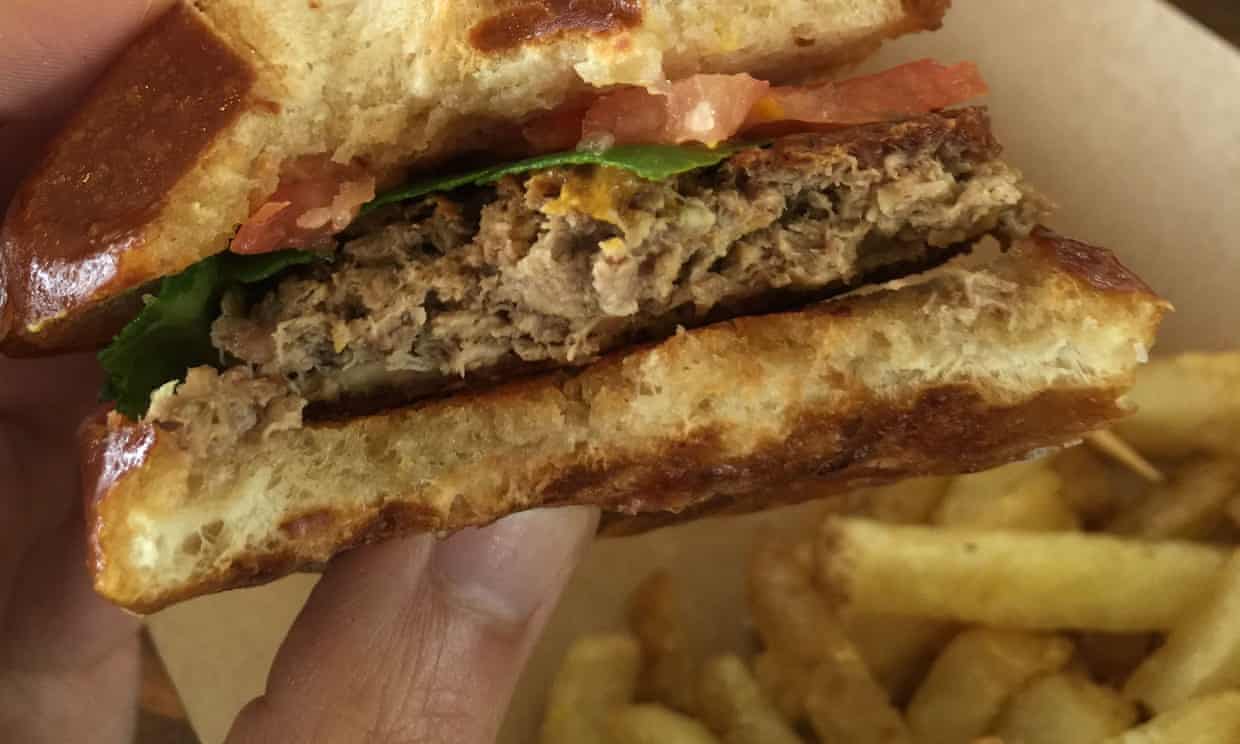
Looks like a burger, tastes like a burger ...


Credit: Nellie Bowles/The Guardian

Rule of thumb is that it takes 10 plant calories to make 1 meat calorie. It follows that, in general, 10 times as many calories are available by eating plant based foods, rather than animals. Environmental impact of plant based foods has a similar advantage. Cattle in particular, have a large carbon footprint due to the amount of methane produced in their digestive tract, & release mainly orally.1

With this in mind, a start up called Impossible Foods, is attempting to create a plant-based burger which is indistinguishable from one made from meat.

Guests at a burger-tasting on Wednesday involving hundreds of burgers (see image above) were generally impressed.

https://www.theguardian.com/technology/2016/jun/02/impossible-foods-plant-burger-taste-test

http://www.techinsider.io/impossible-foods-burger-2016-5
__________

1 Dr Karl Kruszelnicki: “Cow burps bump up methane”, http://www.abc.net.au/science/articles/2010/10/05/3029973.htm
/ Raj Aggarwal took a bite burger chewed chew taste texture tastes like a burger very tasty founder startup Localytics not quite bloody enough though bloody burger made of plants fake meat startup Impossible Foods bloody Impossible Foods burgers realistic uncompromising meat eater won’t be able to tell the difference offset environmental damage cows cattle beef satiate beef-hungry American population consumes 10bn 10 billion pounds of ground beef every year appeals to a hardcore meat lover vegetables Impossible Foods founder CEO Pat Brown Code Conference California deep molecular investigation desirable properties texture juiciness the aromas how it cooks faux burgers New York City restaurant restaurant Impossible Foods employee veggie burger makers Silicon Valley startup in heavy secrecy Code Conference tech-focused event Impossible Foods mass–tasting hundreds of burgers all food manufacturing relies on technology to some extent history food nature combined with human ingenuity Bread plant meat professor Department of Biochemistry biggest threat to the global environment use of animals for food replace meat marketplace market place approach creating food outperforms this market /

Saturday, 4 June 2016

2 weeks with Android N Beta


Credit: digitlab.info

Android N has some interesting new features, including:
● enhanced notifications
● native multi-window mode
● fast app switching

JR Raphael found these & other enhancements so compelling, that he decided to try the beta on his personal phone:
http://www.computerworld.com/article/3077992/android/android-n-beta.html

Want to try the beta? The easy way? – site linked below appears to be down at 01:20 Saturday 08oct2016 – image above impacted too
http://digitlab.info/How-to-install-Android-N-Preview-OTA-Update-via-Android-Beta-Program-Easy-way/

Wikipedia
https://en.wikipedia.org/wiki/Android_N
/ Android N beta on my personal phone living with Google's latest pre-release software don't try this at home using Google's new Android N Beta Nexus 9 tablet put the software onto my own personal phone Nexus 6P using pre-release software developer preview work in progress smart phone smartphone smart-phone rely on morning to night risk Android Google first beta-quality candidate considered stable enough to run on your primary device first two Android N developer previews intended for developers only daily or consumer use N previews tablet device new Android N Beta stability Android N beta inside my pocket Android N device you carry all day different perspective state of the software real-world user experience third pre-release Android N impressively smooth and snappy using a beta version in-progress OS update Android N feels immediately familiar generally a good thing operating system OS Android Google Marshmallow Android N pretty significant in day-to-day use Android N refined notifications 6.0-level device Google clusters of individual cards being grouped together app easily expandable Visual appeal Android N notification native ability respond to a message within its notification enhanced version workaround Google Hangouts feels noticeably more natural to use any app can take advantage of it developers update apps support the feature widespread utility Android N's addition native multi-window mode two apps on screen at the same time Samsung and other manufacturers Samsung devices easy to use value on a tablet productivity-oriented working on a document typing out an email viewing a Web page Android apps the fast-app switching feature Android N tap Overview key twice back and forth between your current process last app you were using flip between apps so quickly super convenient almost always easier taking the time to set up a side-by-side multi-window environment Android Android N' cleaned up Overview interface interface multiple similar-looking instances same app screen cluttered confusing useful Android limiting Overview seven most recently used apps feature much more practical customizable Share menu sharing any app apps Share menus standard system interface counterintuitive Android N expanded Quick Settings interface devices older Android software quick toggles main notification interface handy much better use of screen space control order contents fully expanded Quick Settings menu good Android N Beta third-party apps updated for full N-level optimization some apps Pandora Chrome wallpaper app restart the phone error messages pre-release OS update apps Android N cleaned up Overview menu Overview interface previous versions of Android compatibility issues software Nexus 6P software in a pre-release state final version /

Friday, 3 June 2016

Should I buy an Apple MacBook Pro or Microsoft Surface Pro 4?


Credit: Gizmodo/Lifehacker

Interesting range of views if you are considering these devices, both in the article & the comments.

Something that is largely ignored is size & weight. If portability is of importance, the Surface Pro 4 is smaller & substantially lighter:

Microsoft Surface Pro 4
Weight: 786 grams [0.786 kg = 1.7 pounds]1

MacBook Pro 13 inch
Weight: 1.58 kg (3.48 pounds)2

In that case, the low profile MacBooks (MacBook 12" & Macbook Air 11 & 13 inch) with weights from 0.92 kg (2.03 pounds) to 1.35 kg (2.96 pounds) would probably be most suitable OS X devices.

http://www.lifehacker.com.au/2016/06/ask-lh-should-i-buy-a-macbook-pro-or-surface-pro-4/?utm_source=Lifehacker+Australia&utm_campaign=c493facf48-lifehacker_2016_06_02&utm_medium=email&utm_term=0_9fc709844c-c493facf48-278953185

Microsoft Surface Pro 4
http://www.cnet.com/au/products/microsoft-surface-pro-4/

Apple Macbook Pro 13 inch
http://www.cnet.com/au/products/apple-macbook-pro-13-inch-2015/
________

1 Microsoft: “Surface Pro 4”, https://www.microsoft.com/surface/en-au/devices/surface-pro-4#techspec-block

2 Apple: “MacBook Pro 13-inch”, https://www.apple.com/au/macbook-pro/specs-retina/
/ new laptop pricing different options MacBook Pro Microsoft Surface Pro 4 (i5, 256gb similar specs similar price prefer OSX Surface doubles as a tablet making the right decision stick with Apple end of the financial year waiting for a sale Apple huge discounts products Microsoft EOFY discount buy Surface Pro laptop buyer laptop entertainment purposes stick with the OS you’re familiar with eliminating potential frustrations keep using the applications you know run OSX first-party hardware smoother bug-free experience bug free mainly use the laptop for work go with your company’s preferred operating system company software running on your machine help with IT support mainly want a laptop for personal use vastly prefer Macs swap to Windows free tablet Surface Pro 4 keyboard buy the Type Cover separately single USB port equivalent MacBook Pro Thunderbolt 2 ports HDMI OSX MacBook Pro simply a better computer out of the box using a 12-inch tablet most users eight to 10 inches sweet spot tablet size a bit cumbersome commutes on public transport factor in the cost of the Type Cover connectivity hub buy a cheap tablet MacBook holding off potential sales use PC-Tablet convertibles tablet mode grubby fingerprints on my laptop screen tablet laptop with a keyboard tablet in landscape mode read digital comics way better than a laptop keyboard in portrait mode Surface SP4 pen page turns without grubby fingerprint marks drawing notating music manipulating maps imagery Surface pro 3 tablet ability touch screen use it in conjunction with keyboard desktop at home gestures OSX work network issues compatibility enjoy Windows switching to Windows prefer laptop to a 2 in 1 keyboards better use the machine on your lap use iPad with a keyboard compare Dell 13in XPS Macbook Pro super machines which OS do you prefer how much you use MS Office heavy Word Excel PPT Outlook Windows Visio Project run on Windows MS Office user Macs smoother & faster Windows personal machine Mac work machine Windows BYO iPad personal work apps Google Mail Maps Photos MS Office iPad Pixelmator Google Photos Lightroom family photos tablet iOS Mail Calendar integrate well work MS Exchange server access work stuff on the move SP3 laptop and tablet functions half the weight price of a laptop tablet detach the keyboard use the digital stylus solve problems screen wirelessly plug in an external monitor desk minimal weight of the SP3 bag monitor desk wirelessly send the screen television big screen movie experience kickstand cost SP3 much less equivalent MacBook touch screen pen MacBook equivalent SP4 MacBook laptop Type cover cumbersome SP4 tablet mode public transport MacBook SP4 amazing piece of engineering 12" Macbook amazing piece of engineering performance operating system OS Windows converted to OS X OS X MacBook Windows operating system gaming new Macbook Pro refresh new product discounts on the older Macbook Pro SP4 Macbook Pro MacBook Pro battery life benefits of the SP4 pen touchscreen touch screen smaller lighter battery lasted much longer MacBook Pro issues with sleep mode SP4 Microsoft improve battery management SP4 buying the new device work asset start of the next financial year full year worth of depreciation /

Wednesday, 1 June 2016

Haiku sent from my iPhone


Credit: Arlington Street Investments

While studying Haiku, Matt Madden realized that the default iPhone email signature, “Sent from my iPhone”, contains 5 syllables. I.e. fits the last (or first) line of any Haiku, as in:

By this remote lake
The fireflies blinking brightly.
Sent from my iPhone

– Matt Madden


More
http://mattmadden.com/2016/05/25/iphonic-haiku/

Wikipedia on Haiku
https://en.wikipedia.org/wiki/Haiku
/ studying haiku series of workshops comics and poetry unconsciously look everywhere for 5- and 7-syllable phrases most banal of places factory preset signature Mail app iphone emil signture ubiquitous Sent from my iPhone contains exactly five syllables haiku series haiku haiku poem Japanese Japaneze poetry /

Gorilla Harambe's death: Silverback protecting boy from threat of screaming crowd, expert says


At the Cincinnati Zoo on Sunday, a 4-year-old boy crawled through a barrier & tumbled into a gorilla enclosure.


Because of the perceived threat to the boy, the gorilla was later shot.

It’s hard to understand an animal’s view of the world. Some have interpreted the video as showing aggression by the gorilla.

Professor Gisela Kaplan, from the Centre for Neuroscience & Animal Behaviour at the University of New England (NSW Austalia), has suggested that because of the small size of the boy, he wouldn’t have been seen as a threat by the gorilla. Rather, the gorilla may have taken the cries of the crowd as a sign of aggression & have been attempting to protect the child.

What do you think?

ABC (Australian Broadcasting Corporation)
http://www.abc.net.au/news/2016-05-31/gorilla-harambe-protecting-boy-from-screaming-zoo-crowd:-expert/7462198
/ Gorilla Harambe death shot dead silverback protecting boy threat of screaming crowd expert Australian animal behaviour expert silverback gorilla shot USA zoo perceived screaming adults in the crowd enclosure little boy fell in real threat Harambe 17-year-old western lowland silverback gorilla shot at Cincinnati Zoo Saturday four-year-old boy crawled through a barrier tumbled into its enclosure animal behaviour professor Gisela Kaplan Centre for Neuroscience and Animal Behaviour University of New England NSW Australia gorilla immediately ruled out the boy as a threat known by the sheer size demeanour little boy not a threat size difference does matter in the natural world very obvious to the gorilla the boy not a threat no need to react aggressively dragged the boy through the water they do that with their own young get them out of danger quickly danger were the screaming adults pandemonium total chaos gorilla responded to the screaming took the boy away away from the screaming to save him animal lovers responded to the killing with anger director Cincinnati Zoo decision to shoot Harambe ape endangering the child who fell into the enclosure actually hurting him don't attack willy-nilly Professor Kaplan male silverback gorillas gentle giants conflict negotiators incident controversial tragic incidents American and English zoos gorillas are very gentle males role keep the peace in the group conflict negotiator peace maker peace-maker peacemaker male silverback gorillas not aggressive entire personality peace-keeping peacekeeping peace keeping Professor Kaplan not carnivores they don't kill other things don't kill people don’t attack willy-nilly in the wild is if there is a real threat perceived by the silverback male charge forward warning use branches percussion sound rattle the tree a bit flay his arms around opponent backtrack boy falling in spelt doom and tragedy for gorilla Cincinnati Zoo Professor Kaplan similar incident at Jersey Zoo in the United Kingdom boy about the same age fell into the enclosure didn't shoot the animal gorilla saved the boy from drowning cuddled him calmed down changed the view of gorillas completely not the King Kong image dangerous fierce animal gentle giant Professor Kaplan risk was small animal may have caused harm to the boy moment of panic pandemonium chaos, animals and people make decisions zookeeper we cannot take that risk tragedy gorilla probably came to help shot for it /

Tuesday, 31 May 2016

Cloud backup for all your files


Credit: livewireit.net

For comprehensive information about backup for Macintosh computers, check here.

Cloud backup for all computers – desktop, laptop, phones, tablets – free & paid
http://au.pcmag.com/file-syncing-and-backup
/ computer Mac Macintosh Android iOS Linux Unix Windows stolen damaged replacing hardware technically very easy money data hard disk SSD precious photos carefully amassed iTunes library work novel best case scenario pay hundreds thousands of dollars data recovery specialist worst case gone for good you should back up your computer phone different ways of backing up backup strategy lose any of your files pros and cons different back up backup your computer information data informed decision protecting your data detailed information if you do nothing else, do this easy cheap some basic protection against data loss recommendation good mix of backup methods your data can withstand almost any catastrophe if you do nothing else do this buy a hard disk plug it into your Mac when prompted backup back up accept prompt launch System Preferences pick hard disk backup pane wrong format Macintosh Mac Android iOS iPhone Windows Unix Linux reformat disk utility repartition partition drive single partition Mac OS X format recommended system simple backup process disk connected to your computer good safe backup strategy your data best chance surviving range of problems minimize your down time if disaster strikes back up backup using disk connected to your network extra convenience clone your hard disk daily disk connected to your computer use a cloud backup or peer-to-peer backup service mixing these three strategies file versioning overwrite or delete go back to an earlier draft of a file ability to quickly boot from your cloned disk internal drive fails safeguarded against theft or damage more serious disaster such as fire your data also stored elsewhere in the world cloud other remote backup system three copies of your data if one or more fails options disc disk connected to your computer apps back up backup your files external hard disk simple built-in sure to be supported file versioning simple backup older copies of your files current one restore the most recent version step back through time grab older drafts good idea to buy a hard disk that’s two or more times the size of your internal drive space to store lots of versions all handled automatically hard disks are cheap 4TB drive laptop SD card slot fitting an SD card Micro SD card inside Nifty MiniDrive drive portable hard drive laptop physically connected disk smaller disks 2.5-inch mechanisms 3.5-inch desktop drives bus-powered drawing the power USB port separate power supply set-it-and-forget-it easy cheap built-in supported takes a snapshot of your files every hour easy to retrieve deleted and overwritten files versioning feature restore an entire system have the disk connected for back ups desktop laptop replace a failed internal hard disk boot from it offers no protection against theft local disasters such as fire disk connected to your network back up disk disc connected directly to your network network backing up centrally back up completely automatically over the network every hour via Wi-Fi or ethernet laptops especially connect your backup disk automatically whenever the awake network-attached network attached storage device network router built-in hard disk plugging a hard disk USB port available on the network for Network-Attached Storage NAS backup fireproof waterproof fire proof water proof disks advantages over your home network a little slower speed of your network bandwidth restoring is even slower still connected to your home network extra complexity theft or other local disasters cloning your disk mirror contents of your internal disk to an external drive set schedules internal disk fails boot from the external clone slow level of redundancy down external clone fails FireWire USB boot from USB no protection against local disasters RAID disks Cloud backup services CrashPlan Backblaze Livedrive good data redundancy backup abilities backup back up your photo library documents stored on backup system on iOS peer-to-peer offsite backup CrashPlan initial backup process CrashPlan RAID disaster-proofed drive data encrypted backup drive cloud backup data is protected from theft local disasters CrashPlan Backblaze Livedrive /