Tuesday, 17 May 2016

Real-time translation that fits in your ear


Waverly Labs Pilot in-ear translator will come in three colours
Credit: 3.i.baomoi.xdn.vn/Waverly Labs

Real time translation? Hasn’t that been done?

Yes. It’s probably available on your phone. But Pilot adds two new claims:

● compresses the hardware into something that fits in your ear, so that it is less intrusive on the conversation

● translation is done in the device itself – no data connection required1


More:
http://www.gizmag.com/waverly-labs-pilot-in-ear-translator-translation/43359/

Waverly Labs Web site – enter the draw for a free pair
http://www.waverlylabs.com/launch/

Hat tip to Glenn for this item
__________

1 Waverly Labs: “10. Does it work offline? Yes it is designed to work offline for overseas use.” – http://www.waverlylabs.com/2016/05/faqs-about-early-bird-and-launch-date/
/ Pilot earpiece language barriers live conversation translation Hitchhiker's Guide to the Galaxy Babel fish Star Trek universal translator science fiction break down intergalactic language barriers New York startup Waverly Labs Pilot earpiece in your ear provide near real-time translations of multilingual conversations technology science fiction reality Babel fish from Douglas Adams Hitchhiker's Guide to the Galaxy translate any language in real time Manhattan-based company called Waverly Labs commercializing commercialising electronic device Pilot earpiece listens in to a conversation communicates your smartphone close-to-real time translation several potential weak-link systems clear signal built-in in-built microphone converting signal from speech into text both speakers' languages good effective translation online translation engine Google Microsoft translating each language spoken chatty form convert translation text to speech earbud do all these tasks concurrently if the other person keeps talking all these systems are already out there up and running none are perfect glitchy and inaccurate steadily improving Waverly Labs launch with European Latin and Germanic languages handled far better by online translators Euro-to-Asian language translations Google Translate Microsoft's Skype Translator real-time conversation translation mobile desktop applications Pilot key innovation wearable device whispers the translation into the listener's ear works out in practice inevitable delay translation system the conversation the other party received the translation of the last thing you said super quick Waverly Labs launch the Pilot system pre-orders via Indiegogo deliveries launch a mobile app translation experience on your smartphone pair of earpieces foreign friend communicate real-time translation technology suggest that the language barrier may finally be broken /

Monday, 16 May 2016

Britain's biggest rechargeable battery


Many sustainable sources of electricity are highly variable, most notably solar & wind.

By contrast, some non-sustainable sources of electricity, have little ability to vary their output – most notably nuclear & coal. This is often represented as highly desirable, “base load”.

To balance electricity supply with demand as it occurs, a power source which can be quickly varied is required.

What coal, nuclear, solar & wind have in common is their unsuitability for this purpose.

A sustainable electricity source eminently suited to this purpose is hydro-electricity – water running down hill used to turn turbines, which drive generators to produce electricity. Case in point, the Dinorwig hydro power station in Elidir Mountain, North Wales, can go from zero to 1.32 gigaWatts in 12 seconds, to match rising demand.

Dinorwig, in common with many other hydro installations can also store electricity by pumping water uphill in times of oversupply, such as from solar on sunny days, or from coal or nuclear in the middle of the night. Such a system is called “pumped hydro”.


The Register
http://www.theregister.co.uk/2016/05/16/geeks_guide_electric_mountain/

Wikipedia
https://en.wikipedia.org/wiki/Dinorwig_Power_Station
/ Electric Mountain Elidir Mountain slopes Llyn Peris reservoir smaller higher Marchlyn Mawr reservoir up in the hills dropping two reservoirs one of Britain’s biggest post-war industrial projects Dinorwig pumped storage power station mountain effectively a monster battery power is stored pumping water from Llyn Peris to Marchlyn Mawr at night generated by letting it flow back down at times of peak demand Dinorwig designed supplement Britain’s national grid station First Hydro Company owned by Engie and Mitsui fastest installations of its kind peak output of 1.728GW Wales power station massive industrial equivalent uninterruptible power supply Dinorwig through visitor centre Electric Mountain Llanberis other side of the valley Snowdonia national park Dinorwig power lines underground power station publicly owned Central Electricity Generating Board 10 miles of tunnels central hall six valve units National Grid Britain’s power supply analyse television schedules breaks in popular television programmes TV pick-up in power demand coal and nuclear power stations take hours to increase output solar tidal wind power Pumped storage stations Dinorwig designed specifically to cope with spikes in demand power station power-flushes lake through a Welsh mountain ramp valley power station site mountain station travel downhill tunnel steeply quickly Francis reversible fixed-speed turbine magnet magnetic repulsion generate electricity industrial scale cavern six enormous water slides flowing artificial cave main inlet valves Dinorwig six turbine units giant taps water upper reservoir flows gently sloping tunnel falls 450 metres 1,476ft vertically sloping tunnel speeding it up manifold six pipes turbine two 16 tonne yellow counterweights climb a metal staircase turbine hall power station Francis reversible fixed-speed turbines bigger casings turbine made by Markhams of Chesterfield British industry turbine hall vast scale internal floors Dinorwig Dinorwig recovers 76 per cent of the energy it uses to pump the water up the pipes at night 76% efficient Dinorwig’s construction mountain above the power station uphill Snowdon Pass of Llanberis power station Electric Mountain working power station station caverns machinery Dinorwig British engineering history /

Sunday, 15 May 2016

Complete, easy guide to backing up your Macintosh


Credit: LaCie

Backup – we all know we should, but do you? How much do you have to lose? Photographs? Music? Video? Documents? How much work?

If you have a recent Macintosh, the article linked below explains how to do it all.

Focus is on recent OS X, but if you are using another OS (including older versions of OS X, phones & tablets), some of it, including online backup with services such as CrashPlan, Backblaze & Livedrive, will be useful to you too.

http://www.idgconnect.com/abstract/12227/the-complete-easy-guide-backing-mac
/ Mac stolen damaged replacing hardware itself technically very easy money data hard disk SSD precious photos carefully amassed iTunes library work novel best case scenario pay hundreds thousands of dollars data recovery specialist worst case gone for good you should back up your Mac computer phone different ways of backing up backup strategy lose any of your files pros and cons different back up backup your computer information data informed decision protecting your data detailed information if you do nothing else, do this easy cheap some basic protection against data loss recommendation good mix of backup methods your data can withstand almost any catastrophe if you do nothing else do this buy a hard disk plug it into your Mac when prompted Time Machine backup accept prompt launch System Preferences pick hard disk Time Machine backup pane wrong format Macintosh Mac offer reformat it for you launch Disk Utility repartition drive single partition GUID map Mac OS X Extended format Time Machine every version of OS X since OS X 10.5 recommended system simple backup process Time Machine disk connected to your Mac good, safe backup strategy your data best chance surviving range of problems minimize your down time if disaster strikes back up backup using Time Machine disk connected to your network extra convenience clone your hard disk daily to a disk connected to your Mac use a cloud backup or peer-to-peer backup service mixing these three strategies file versioning Time Machine overwrite or delete go back to an earlier draft of a file ability to quickly boot from your cloned disk internal drive fails safeguarded against theft or damage more serious disaster such as fire your data also stored elsewhere in the world cloud or other remote backup system three copies of your data if one or more fails options Time Machine disk connected to your Mac apps back up backup your files external hard disk Time Machine is simple built-in sure to be supported file versioning simple backup older copies of your files current one restore the most recent version step back through time grab older drafts good idea to buy a hard disk that’s two or more times the size of your internal drive space to store lots of versions all handled automatically hard disks are cheap 4TB drive laptop SD card slot fitting an SD card Micro SD card inside Nifty MiniDrive Time Machine drive Time Machine portable hard drive Time Machine laptop physically connected disk smaller disks 2.5-inch mechanisms 3.5-inch desktop drives bus-powered drawing the power USB port separate power supply set-it-and-forget-it easy cheap built-in supported takes a snapshot of your files every hour easy to retrieve deleted and overwritten files versioning feature restore an entire system have the disk connected for back ups desktop laptop replace a failed internal hard disk boot from it offers no protection against theft local disasters such as fire Time Machine disk connected to your network Time Machine back up disk disc connected directly to your network network backing up centrally back up completely automatically over the network every hour via Wi-Fi or ethernet laptops especially connect your backup disk automatically whenever the Mac is awake Time Machine network-attached storage device Apple’s Time Capsule network router built-in hard disk plugging a hard disk AirPort Extreme’s USB port available on the network for Time Machine Network-Attached Storage NAS Time Machine backup fireproof waterproof fire proof water proof disks advantages of Time Machine over your home network a little slower speed of your network bandwidth restoring is even slower still connected to your home network extra complexity theft or other local disasters cloning your disk SuperDuper! Carbon Copy Cloner mirror contents of your internal disk to an external drive set schedules internal disk fails boot from the external clone slow level of redundancy down external clone fails FireWire USB PowerPC Macs can’t boot from USB no protection against local disasters RAID disks Cloud backup services CrashPlan Backblaze Livedrive good data redundancy iCloud’s backup abilities backup back up your photo library documents stored on iCloud Drive backup system on iOS peer-to-peer offsite backup CrashPlan initial backup process CrashPlan RAID disaster-proofed drive data encrypted backup drive cloud backup data is protected from theft local disasters CrashPlan Backblaze Livedrive /

Saturday, 14 May 2016

NASA unveils first Mercury maps from MESSENGER spacecraft


Credit: http://kenh14.vn/

While the image above may look like the surface of the Moon, it is actually Mercury, although the reasons are the same: impact craters. Images are from the MESSENGER (for MErcury Surface, Space ENvironment, GEochemistry, and Ranging) spacecraft which ended its mission with an impact on the planet surface on 30 April, 2015.

http://www.extremetech.com/extreme/228110-nasa-unveils-first-mercury-topography-maps-from-messenger-craft
/ NASA Mercury topography maps MESSENGER space craft spacecraft
MESSENGER Mercury explorer 4,104 orbits around the planet closest to our sun one-year mission MESSENGER expiry stayed in orbit around Mercury protected by its ceramic cloth sunshade ran out of fuel crash landed on the far side of the planet 30 April 2015 NASA analyzing data probe topographic maps Mercury’s surface MESSENGER MErcury Surface Space ENvironment GEochemistry Ranging characterize Mercury’s surface chemistry geological history exosphere quasi-atmosphere rarefied gas Mercury’s strangely paired core magnetosphere technological firsts first spacecraft to orbit Mercury first image Mercury MESSENGER 2011 extension extended mission March 2015 MESSENGER descended high eccentric orbit hover altitudes planet’s surface shallow orbit MESSENGER’s surface team execute seven orbit correction maneuvers LASER laser topographic images complete topographic map of Mercury planet surface elevation altitude lowest point 5km below its average elevation highest point 4km above average MESSENGER past volcanic activity extensive lavas APL Applied Physics Laboratory Nancy Chabot Instrument Scientist Mercury Dual Imaging System MDIS Mercury relatively young surface completely refreshed violence frequency volcanic activity. Consequently, no part of its surface is quite as old as the planet itself, making the project of mapping Mercury’s topography an ongoing challenge MESSENGER spent most of its time close to Mercury around the planet’s high northerly latitudes mean that, just like on Earth, in its pictures the sun is always low in the sky. Long shadows can obscure the real color characteristics of the rocks. So MESSENGER’s MDIS captured images planet’s north pole five narrow-band color filters 1100-lb spacecraft image 93-km Jokai crater MESSENGER source of data ESA’s BepiColombo spacecraft orbit Mercury MESSENGER crater scientists precise timepoint time point measure the rate surface weathering micrometeorites sculpt planet’s craterous surface MESSENGER chemistry specialist neutron spectrometer gamma spectroscopy data images Mercury’s surface chemistry elements geological ages /

Friday, 13 May 2016

Gboard – Google makes a better iPhone


Today, Google released a keyboard for iOS it calls, Gboard. Features include swipe typing, & (being Google), search, including emoji search & animated GIF search.


http://betanews.com/2016/05/12/google-apple-iphone-gboard-keyboard/

http://arstechnica.com/gadgets/2016/05/googles-gboard-for-ios-combines-a-keyboard-with-google-search/

Get it at the App Store:
https://itunes.apple.com/us/app/gboard-search.-gifs.-emojis/id1091700242?mt=8
/ Google launched Gboard iOS keyboard combines Google Search typing type keyboard search local business images animated GIFs Gboard looks like a normal keyboard except for the Google icon left side suggestion bar Google search bar suggestions type in a query usual return send button turn blue search results appear horizontally scrolling interface keyboard area sift through search results without leaving current app tiny tabs on the bottom for normal search results images GIFs normal results pasted into the conversation usable text picture of the Google results card normal search results local businesses Google answer cards card weather celebrity direct answer to a question find YouTube videos drop them into a conversation offer a better way to get media search results conversation show a friend a trailer on YouTube work flow workflow leaving the app opening search typing your query copying the result messaging app pasting the link Gboard do all that without leaving the current app saving Gboard is also a normal keyboard supports swiping Google Keyboard on Android search emojis emoji suggestions list keyboard available in the App Store glide typing keyboard swype typing swipe typing /

Thursday, 12 May 2016

USB-C docking & charging station


Apart from the headphone socket, Apple's MacBook 12" has only one port for all i/o, including data & video, plus charging. Even that is the still-uncommon, USB-C.

Most users will require some sort of adapter to expand i/o. Apple has some, but unsurprisingly, they are far from inexpensive.


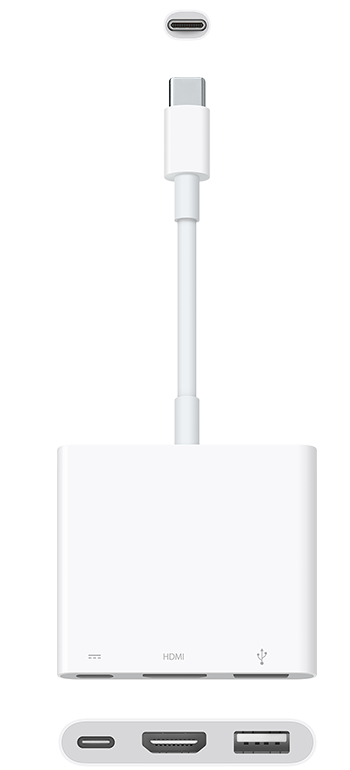
Apple USB-C Digital AV Multiport Adapter
USB-C, HDMI, USB 3.0

Credit: Apple

And, compared to the Marble USB-C docking & charging station, quite limited.


Marble USB-C docking & charging station
Credit: MOFILY/Kickstarter

Compared to the nearest Apple equivalent, Marble adds:
1 more USB-C port
1 more USB 3.0 port
microSD card reader
60 Watt AC power adapter
10.5 Watt charging for your phone or other mobile device (x2)

Marble can also charge &/or expand the functionality of other devices, including laptops, phones & tablets.

Also available is the Marble DCS2 which replaces the full size HDMI port with micro HDMI & Mini DisplayPort.


Marble is not much larger than an Apple power adapter
Credit: MOFILY/Kickstarter

More about the Marble USB-C docking & charging station on Kickstarter:
https://www.kickstarter.com/projects/2121748736/marble-a-portable-2-in-1-usb-c-docking-and-chargin?ref=nav_search
/ Marble portable USB-C docking charging station Apple MacBook 12 inch expand USB-C HDMI DisplayPort USB USB-C USB A microSD charge 4x devices simultaneously built-in 60W AC 12" MacBook XPS13 9350 laptops new powerful USB Type-C port computer power data transfer input output i/o wired single USB-C port single port Marble ultra-portable 2-in-1 docking charging station designed work with USB-C devices Apple’s new 12-inch Macbook Dell XPS 13 9350 Samsung TabPro S Huawei Matebook Chromebook Pixel Marble’s port expansion function devices USB 3.1 port charging function USB 3.1 devices charging voltage device voltages: 5V 9V 12V 14.5V 19V Marble disabled charging function third-party chargers HP Spectre X2 Marble compact connect multiple devices USB-C ported laptop Macbook Dell XPS13-9450 Samsung TabPro S Huawei Matebook USB 3.0 high-speed ports 2 USB-C ports MSD 4.0 microSD card reader monitor extension ports HDMI Mini Displayport Marble 60W AC adapter chargers adapters smartphone tablet other devices Marble Marble charge USB-C port laptop devices AC outlet Marble multifunctional hub laptop power supply USB ports automatically switch from AC to laptop total maximum power output of 5V 1.5A USB bc1.2 specifications travel companion connecting laptop Marble much more powerful charger /

Tuesday, 10 May 2016

Last coal-fired power generator in South Australia switched off


Shortly after the shut down of its last coal fired power station, South Australia’s electricity was being supplied by a mix of gas, wind & solar
Credit: Renew Economy – reneweconomy.com.au

South Australia's last coal-fired power station was shut down at 09:40 on Monday 09 May, South Australian Local Time.

http://reneweconomy.com.au/2016/last-coal-fired-power-generator-in-south-australia-switched-off-88308

A "Live Generation" feed of the information shown in the image at the top of this item is available at:
http://reneweconomy.com.au/nem-watch

From my observations, "NEM Time", used in the "Live Generation" feed, is Australian Eastern Standard Time (AEST) +4 minutes to -1 minute. E.g. "10:20 (NEM Time)", in the diagram at the top, means between 10:16 & 10:21 AEST.
/ last coal-fired power generator South Australia switched off 520MW MW mega Watt Northern brown coal power generator last coal fired power station South Australia switched off last time Monday morning decarbonised grid Port Augusta switched Alinta Energy generation falling wholesale power prices renewable energy wind solar graph RenewEconomy Live Generation widget coal power station closed down coal-fired generator replaced by solar power strong community support 110MW solar tower storage facility built Coalition Labor indicated interest supporting solar tower technology growing need dispatchable generation wind solar PV rise above 50 per cent Port Augusta Mayor Sam Johnson Upper Spencer Gulf transform renewable resource centre tender South Australian government low-carbon technology solar tower contract existing gas-fired generation withdrawal last coal-fired generator loss of grid stability soaring power prices Australian Energy Market Operator no increased risk to reliability equipment failure gas-fired generator did not follow market instructions scare campaigns power pricing locking in high-priced contracts local retailers customers are paying twice what they need to pay price of electricity wholesale market $200/MWh jumps were replicated in most states National Electricity Market traders outages coal fired generation on maintenance 2,000MW Liddell coal plant in NSW offline for two months boiler tube leaks South Australia pricing more volatile withdrawal Alinta market dominated two major generation companies AGL Energy GDF Suez more than 60 per cent market share Australian Energy Regulator strategic bidding surges in spot prices market /